For Android · 50+ languages
Say it. It's done.
Kora is an assistant that carries out what you ask on your actual phone — the message, the booking, the reminder — instead of telling you how to do it yourself.

Free to use every day.
Kora Plus adds the rest — 7 days free on Google Play.
Ask in whatever language you think in. Kora answers in the same one.
For example: say “Hey Kora, tell Mum I’m on my way”, and Kora sends that message on WhatsApp. More examples follow below.
- Free on Google Play
- 50+ languages, 25 spoken aloud
- Works with WhatsApp, Telegram, Calendar, Spotify and YouTube
Why Kora exists
Voice assistants got very good at answering, and stayed bad at doing.
Ask the assistant already on your phone to message a friend and it manages one sentence, in one app, in English, if you phrase it the way it expects. Ask it to move tomorrow's meeting, tell your sister you're running late, and put the receipt from that photo into your notes, and you are back to tapping through four apps yourself.
Kora was built the other way round. Understanding the request is the easy half; the hard half is opening the right app, finding the right person, filling the right field, and confirming before anything is sent. That's the part Kora does — and the part that keeps working when you're driving, cooking, or holding a baby.
It also had to work for people who don't think in English. Most assistants treat every other language as a translation layer bolted onto an English product. Kora treats your language as the default: she listens, acts and replies in it, with real regional voices rather than an English accent reading foreign words.
What you say · what happens
One sentence in, a finished task out.
No commands to memorise and no menus to learn. These are ordinary requests and the actions Kora takes on your phone.
“Tell Mum I'm on my way”
Reads the message back, then sends it on WhatsApp
“What do I have this week?”
Reads your real calendar and talks you through it
“Move my dentist to Thursday”
Finds the event and reschedules it
“Get me a ride to the airport”
Opens Uber or Bolt with the destination set
“What did I miss?”
Reads your notifications aloud, replies if you want
“What's he saying?” + a shared voice note
Writes it out, sums it up, drafts your reply
“Play MrBeast's latest video”
Finds it on YouTube and plays it
“What's this?” + photo of a receipt
Reads it, totals it, files it in your notes
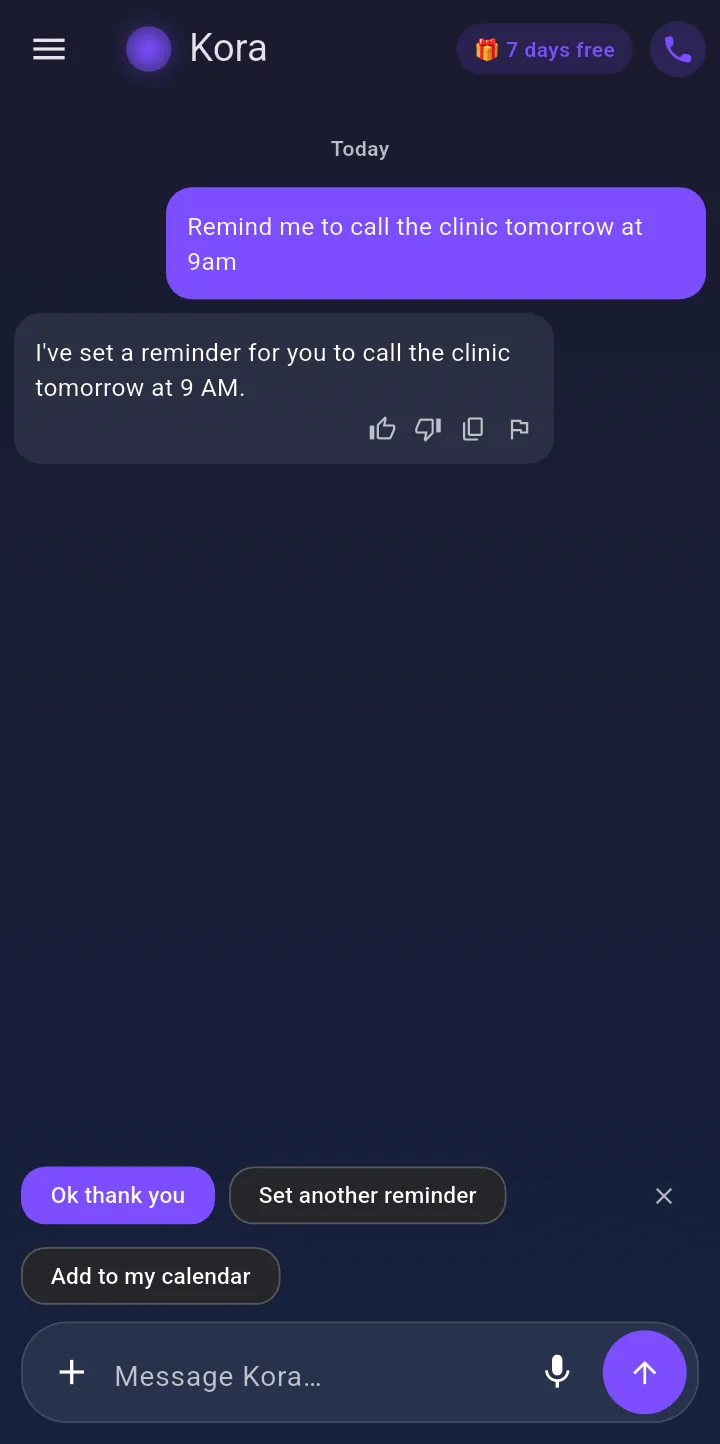
“Remind me to call the clinic every Monday”
Sets a repeating reminder that survives a reboot
“Make a birthday card for Rose”
Creates the image in the chat, ready to send
New · Voice notes
Voice notes, handled.
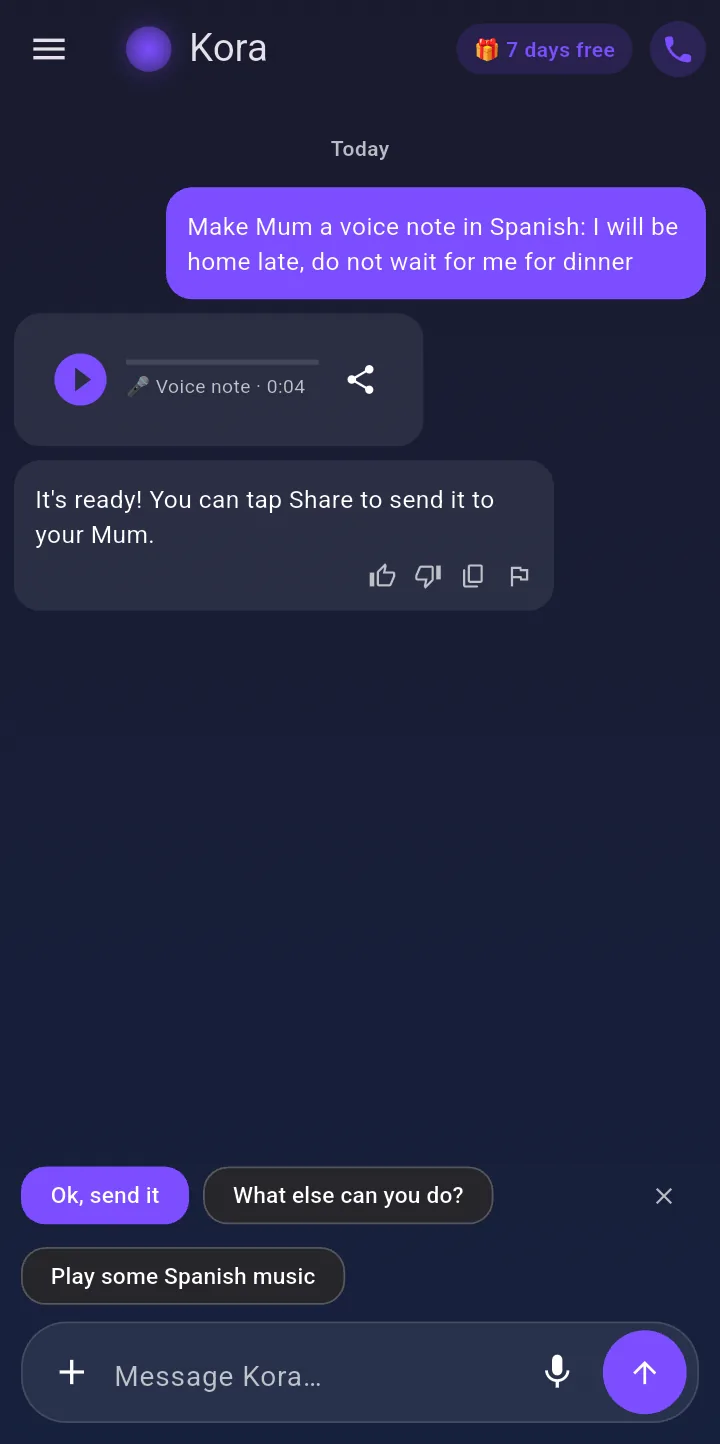
The one you can't play in a meeting, and the one you'd rather not record yourself. Kora does both.
Someone sends you one
Share any WhatsApp or Telegram voice note to Kora. She writes it out, sums it up and drafts your reply.
You need to send one
Kora records it in her own voice, translated if you like, ready to send on WhatsApp.
See it working
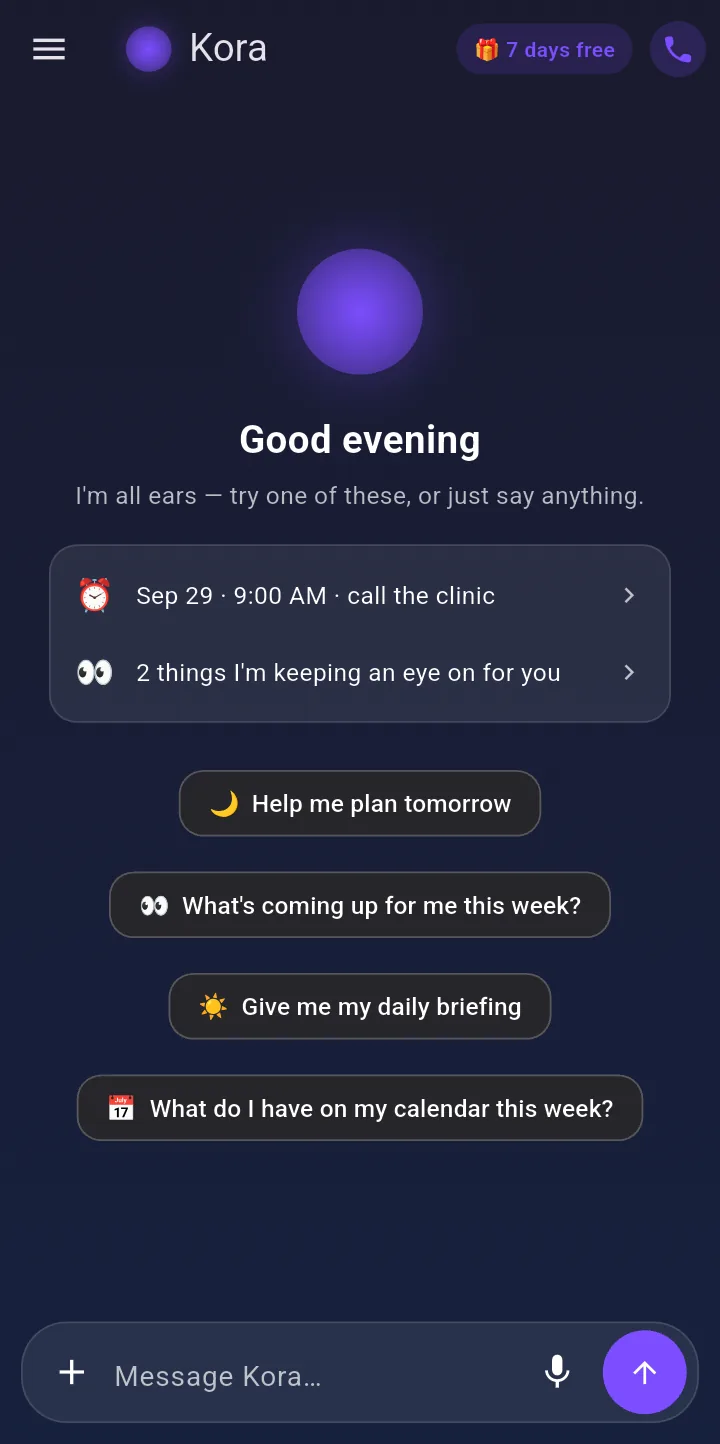
Kora, on a real phone.
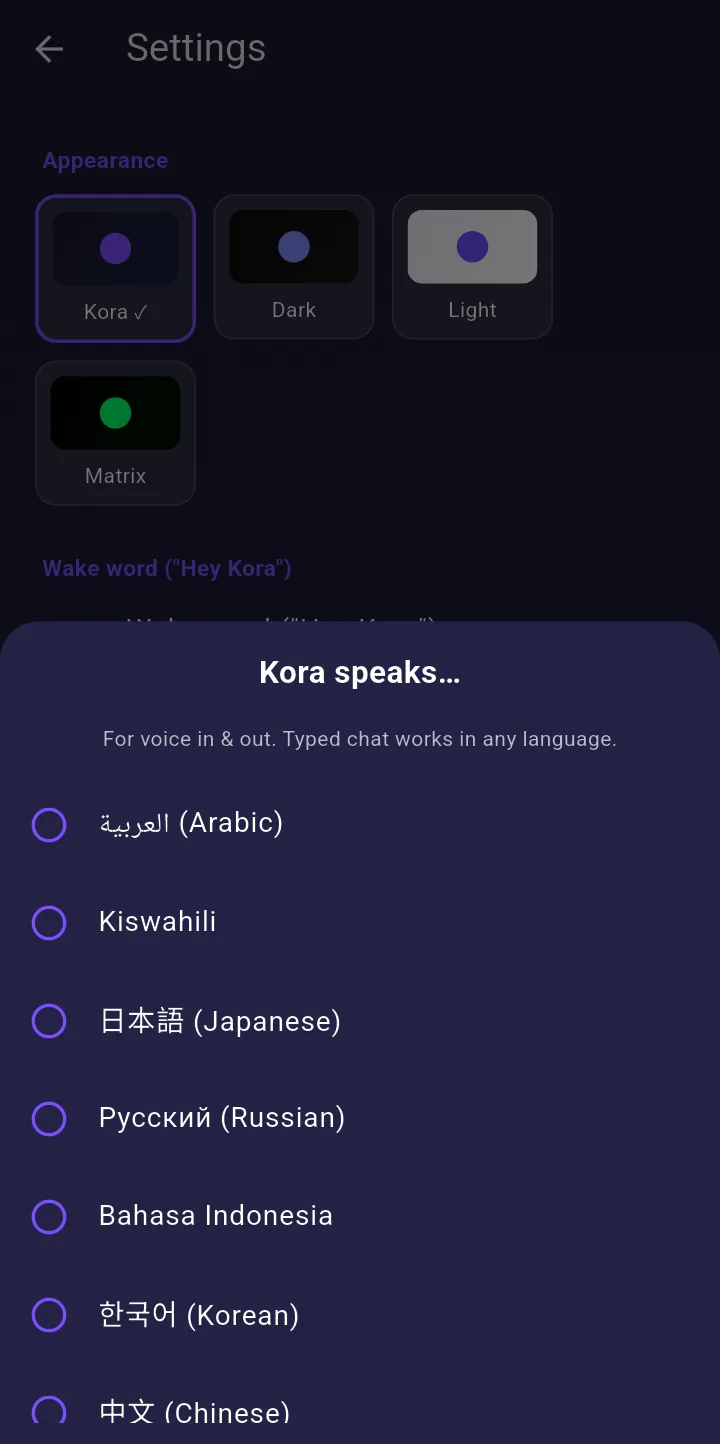
Straight from the current app: your day at a glance, a voice note made for you, a task done, and 25 languages to talk in.
The difference
Not a chatbot with a microphone.
Chat apps are good company. Kora is the one you hand the task to.
A chat assistant
Kora
A chat assistantTells you the steps to send the message
KoraWrites it, opens the chat, waits for your tap
A chat assistantStarts fresh every conversation
KoraRemembers your people, plans and preferences — and asks how the interview went
A chat assistantAnswers, then it's over
KoraFollows up on its own: a morning briefing, a nudge before the exam
A chat assistantNeeds the app open and your hands free
KoraAnswers to “Hey Kora” with the phone locked in your pocket (Kora Plus)
A chat assistantEnglish first, everything else translated
KoraListens, acts and speaks in your language natively
Everything else she handles
The long list.
Messages
WhatsApp, Telegram, SMS, email
Dictate it, hear it read back, and she opens the app with it written. Nothing leaves your phone until you tap send.
Calendar
Reads and edits your real diary
Adds, moves and cancels events without you tapping through a form.
Voice
Live calls, not walkie-talkie
Ring her up and talk normally — interrupt mid-sentence, she keeps up.
Memory
She knows your context
Your people, your goals, the small things. Editable and deletable, any time.
Vision
Show her the problem
A form, a label, a menu, a receipt. She reads it and helps you act on it.
Around you
Places, directions, rides
“Nearest pharmacy?” gets an answer in the chat first, directions second.
Money
Reads, never touches
Answers “what did I spend today?” from your bank and mobile-money alerts. Read-only by design.
Wellbeing
Notices the rough days
Tracks wins and streaks, offers a breathing exercise, or just listens.
Voice notes
Hears them so you don't have to
Share one and get the gist plus a reply. Or have her record one for you, in her voice.
Video
Any video, by name
“Play MrBeast's latest” or “that pasta recipe video”. She finds it on YouTube and plays it.
Your day
Mornings, sorted
A morning briefing with your plans and reminders, and a recap of your month.
Hands-free
Just say “Hey Kora”
Wake her with your voice, even with the phone locked. Part of Kora Plus.
From Google Play
What people actually say.
Real reviews from Google Play. Ones written in another language are translated, and marked.
Rated 5 out of 5
“10/10 Excellent AI (although it asks you to buy to talk more), but it's a good AI for tasks”
Translated from Spanish
Rated 5 out of 5
“KORA is your day-to-day assistant that keeps you reminded of your activities. Every morning, you receive a notification on what your day looks like, meetings, appointments, and the rest. On this, I'd recommend this app so much. Easy to navigate.. 😊😊😊 I love it!!!”
Rated 5 out of 5
“Super good, responds very quickly, I highly recommend them.”
Translated from Spanish
Rated 5 out of 5
“It's usable for now 🤓☝️, pretty good, quick replies, okay 👯”
Translated from Vietnamese
Rated 5 out of 5
“Wow, this AI is amazing!”
Translated from Spanish
Rated 5 out of 5
“great App”
Translated from Italian
Rated 5 out of 5
“This is your personal assistant right in your pocket. from reminders to executing tasks for you with ease and precision, Kora will do it for you. I highly recommend it to all of you!”
Rated 5 out of 5
“Kora is a great AI companion and personal assistant. it helps me stay organized, answers my questions and makes everday tasks easier.”
Pricing
Free is genuinely usable.
The free plan is a working assistant, not a demo. Plus removes the ceilings and adds the hands-free parts.
Free
$0
No card, no trial clock.
- Chat and actions every day
- Messages, calls, calendar, rides, music, maps
- Photo understanding and reminders
- A daily taste of live voice
- All 50+ languages
Plus · 7 days free
Your local price
Monthly or yearly at your country's price, shown in Google Play before you pay. Try it free for 7 days; cancel before it renews and you pay nothing.
- Hands-free “Hey Kora”, even locked
- Real-time voice calls
- Image creation in chat
- No daily message ceiling
- Premium natural voices
Privacy
Powerful permissions, asked for one at a time.
Kora only requests a permission at the moment a feature needs it, and explains why right then. Nothing is switched on quietly.
- ✓Nothing sends unconfirmed. Messages and emails are read back before they go.
- ✓Read-only with money. Kora can summarise your alerts. She cannot move funds.
- ✓You can see her memory. Review, edit or wipe what Kora remembers, in the app.
- ✓Delete everything. One tap removes your account and all its data.
- ✓Never sold. Your conversations are not advertising inventory.
Questions
Before you download.
What can Kora actually do on my phone?
With your permission: send WhatsApp, Telegram and SMS messages, send email, place calls, add and move calendar events, set alarms and repeating reminders, play music and any YouTube video, open and control apps, read your notifications and reply for you, sum up voice notes you share and record new ones in her voice, find places near you, and create images. You ask in plain words; she does the steps.
How is this different from the assistant already on my phone?
Most assistants answer questions and handle a short list of built-in commands. Kora carries out multi-step tasks across your real apps, remembers what you told her weeks ago, and works the same way in 50+ languages rather than only in English.
Does “Hey Kora” need Plus?
Yes — the hands-free wake word is a Kora Plus feature, included in the 7-day free trial. Everything else, including chatting and every action above, works on the free plan without it.
How does the 7-day free trial work?
You start it in Google Play, which asks for a payment method but charges nothing for 7 days. Cancel before then in Google Play → Payments & subscriptions and you pay nothing; otherwise Plus renews at your local price.
What languages does Kora speak?
Chat in over 50 languages and talk out loud in 25, including English, Español, Português, Русский, Türkçe, Français, Deutsch, Italiano, Kiswahili, العربية, हिन्दी, فارسی, Українська, Polski, 日本語, 한국어, 中文, Bahasa Indonesia and Tiếng Việt. Kora replies in whatever language you use.
Do I have to grant every permission?
No. Each one is optional and asked for in context — Kora only needs calendar access when you ask about your calendar. Decline anything you like; the rest keeps working.
Can I delete my data?
Any time. In the app, open the menu, go to Settings and tap Delete account to remove your account and everything stored with it, or use the data deletion page.
iPhone
Kora is Android-first.
Acting on your phone needs permissions iOS doesn't hand out yet. Leave your email and we'll tell you the day that changes.

Stop tapping. Just ask.
Free to start, on Google Play.